> helm repo add bitnami https://charts.bitnami.com/bitnami > helm repo list > helm repo update > helm search repo bitnami/mysql NAME CHART VERSION APP VERSION DESCRIPTION bitnami/mysql 6.14.8 8.0.21 Chart to create a Highly available MySQL cluster
执行helm包的安装,需要自定义配置文件,也就是values.yaml。我们可以先行下载 mysql chart包。
global.storageClass=hostpath 可通过kubectl get sc查看集群支持的storageClass,我这边选择默认的hostpath。其创建的pv的默认回收策略为delete,也就意味着卸载mysql,数据直接删除,这点需要注意!!!如果需要保留测试数据,请更新storageClass。
> kubectl create ns db #创建单独db命名空间 > helm install mysql-apollo . -f dev-mysql-values.yaml -n db NAME: mysql-apollo LAST DEPLOYED: Sun Aug 16 11:01:18 2020 NAMESPACE: db STATUS: deployed REVISION: 1 TEST SUITE: None NOTES: Please be patient while the chart is being deployed
Tip:
Watch the deployment status using the command: kubectl get pods -w --namespace db
> kubectl run mysql-apollo-client --rm --tty -i --restart='Never' --image docker.io/bitnami/mysql:8.0.21-debian-10-r17 --namespace db --command -- bash # 创建mysql-client pod I have no name!@mysql-apollo-client:/$ mysql -h mysql-apollo.db.svc.cluster.local -uroot -proot # 连接至master 节点 mysql: [Warning] Using a password on the command line interface can be insecure. Welcome to the MySQL monitor. Commands end with ; or \g. Your MySQL connection id is 61 Server version: 8.0.21 Source distribution
Copyright (c) 2000, 2020, Oracle and/or its affiliates. All rights reserved.
Oracle is a registered trademark of Oracle Corporation and/or its affiliates. Other names may be trademarks of their respective owners.
Type 'help;' or '\h' for help. Type '\c' to clear the current input statement.
mysql> show databases; # 查看databases; +--------------------+ | Database | +--------------------+ | ApolloConfigDB | | ApolloPortalDB | | information_schema | | my_database | | mysql | | performance_schema | | sys | +--------------------+ 7 rows in set (0.00 sec)
mysql> use ApolloConfigDB; # 切换至ApolloConfigDB; Reading table information for completion of table and column names You can turn off this feature to get a quicker startup with -A
> helm repo add apollo http://ctripcorp.github.io/apollo/charts > helm search repo apollo NAME CHART VERSION APP VERSION DESCRIPTION apollo/apollo-portal 0.1.0 1.7.0 A Helm chart for Apollo Portal apollo/apollo-service 0.1.0 1.7.0 A Helm chart for Apollo Config Service and Apol...
> kubectl create ns apollo # 创建apollo 命名空间 > helm install --dry-run --debug apollo-dev-svc . -f dev-apollo-svc-values.yaml -n apollo # 测试安装,验证模板生成的资源文件是否有误 > helm install apollo-dev-svc . -f dev-apollo-svc-values.yaml -n apollo NAME: apollo-dev-svc LAST DEPLOYED: Sun Aug 16 11:17:38 2020 NAMESPACE: apollo STATUS: deployed REVISION: 1 TEST SUITE: None NOTES: Get meta service url for current release by running these commands: echo http://apollo-dev-svc-apollo-configservice.apollo:8080
For local test use: export POD_NAME=$(kubectl get pods --namespace apollo -l "app=apollo-dev-svc-apollo-configservice" -o jsonpath="{.items[0].metadata.name}") echo http://127.0.0.1:8080 kubectl --namespace apollo port-forward $POD_NAME 8080:8080
这里要记住上面的meta service url:http://apollo-dev-svc-apollo-configservice.apollo:8080
那如何确认正确部署了呢:
1 2 3 4 5 6 7 8 9 10 11 12 13 14 15 16
> kubectl get all -n apollo # 查看apollo命名空间下部署的资源 NAME READY STATUS RESTARTS AGE pod/apollo-dev-svc-apollo-adminservice-7d4468ff46-gw6h4 1/1 Running 0 3m26s pod/apollo-dev-svc-apollo-configservice-58d6c44cd4-n4qk9 1/1 Running 0 3m26s
NAME TYPE CLUSTER-IP EXTERNAL-IP PORT(S) AGE service/apollo-dev-svc-apollo-adminservice ClusterIP 10.99.251.14 <none> 8090/TCP 3m26s service/apollo-dev-svc-apollo-configservice ClusterIP 10.108.121.201 <none> 8080/TCP 3m26s
NAME READY UP-TO-DATE AVAILABLE AGE deployment.apps/apollo-dev-svc-apollo-adminservice 1/1 1 1 3m26s deployment.apps/apollo-dev-svc-apollo-configservice 1/1 1 1 3m26s
NAME DESIRED CURRENT READY AGE replicaset.apps/apollo-dev-svc-apollo-adminservice-7d4468ff46 1 1 1 3m26s replicaset.apps/apollo-dev-svc-apollo-configservice-58d6c44cd4 1 1 1 3m26s
指定配置源 ,主要是envs和metaServers两个配置项: config.envs=dev config.metaServers.dev=http://apollo-dev-svc-apollo-configservice.apollo:8080(上面部署apollo service输出的apollo service url)如果同时启用开发、测试和生产环境。可以配置为:envs: "dev,uat,prd",metaServers 分别指定对应环境的配置即可。 以下是只启用开发环境的配置:
1 2 3 4 5 6 7 8 9 10 11 12 13 14 15
config: # spring profiles to activate profiles: "github,auth" # specify the env names, e.g. dev,pro envs: "dev" # specify the meta servers, e.g. # dev: http://apollo-configservice-dev:8080 # pro: http://apollo-configservice-pro:8080 metaServers: dev: http://apollo-svc-dev-apollo-configservice.apollo:8080 # dev: http://apollo.shisheng.wang # specify the context path, e.g. /apollo contextPath: "" # extra config files for apollo-portal, e.g. application-ldap.yml files: {}
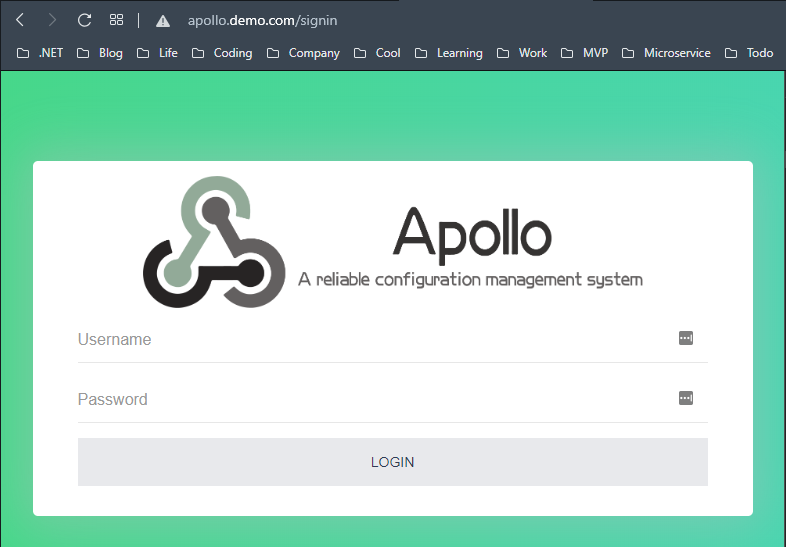
> Helm install --dry-run --debug apollo-dev-portal . -f dev-apollo-portal-values.yaml -n apollo # 测试安装,验证模板生成的资源文件是否有误 > Helm install apollo-dev-portal . -f dev-apollo-portal-values.yaml -n apollo PS C:\Users\Shengjie\k8s\helm\charts\apollo\apollo-portal> Helm install apollo-dev-portal . -f dev-apollo-portal-values.yaml -n apollo NAME: apollo-dev-portal LAST DEPLOYED: Sun Aug 16 11:53:18 2020 NAMESPACE: apollo STATUS: deployed REVISION: 1 TEST SUITE: None NOTES: Get apollo portal url by running these commands: http://apollo.demo.com/
configService: name: apollo-configservice fullNameOverride: "" replicaCount: 1 containerPort: 8080 image: repository: apolloconfig/apollo-configservice pullPolicy: IfNotPresent imagePullSecrets: [] service: fullNameOverride: "" port: 8080 targetPort: 8080 type: ClusterIP ingress: enabled: true annotations: kubernetes.io/ingress.class: nginx nginx.ingress.kubernetes.io/rewrite-target: /$2 hosts: - host: "apollo.demo.com" paths: ["/config-svc(/|$)(.*)"] tls: [] liveness: initialDelaySeconds: 100 periodSeconds: 10 readiness: initialDelaySeconds: 30 periodSeconds: 5 config: # spring profiles to activate profiles: "github,kubernetes" # override apollo.config-service.url: config service url to be accessed by apollo-client configServiceUrlOverride: "http://apollo.demo.com/config-svc" # override apollo.admin-service.url: admin service url to be accessed by apollo-portal adminServiceUrlOverride: ""
修改完毕,执行以下命令升级apollo service:
1 2 3 4 5 6 7 8 9 10 11 12 13 14 15 16 17
> helm upgrade apollo-service-dev . -f dev-apollo-svc-values.yaml -n apollo
NAME: apollo-service-dev
LAST DEPLOYED: Tue Aug 18 14:20:41 2020
NAMESPACE: apollo
STATUS: deployed
REVISION: 1
TEST SUITE: None
NOTES:
Get meta service url for current release by running these commands:
  echo http://apollo-service-dev-apollo-configservice.apollo:8080

For local test use:
  export POD_NAME=$(kubectl get pods --namespace apollo -l "app=apollo-service-dev-apollo-configservice" -o jsonpath="{.items[0].metadata.name}")
  echo http://127.0.0.1:8080
  kubectl --namespace apollo port-forward $POD_NAME 8080:8080
> curl http://apollo.demo.com/config-svc
[{"appName":"apollo-configservice","instanceId":"apollo-configservice:http://apollo.demo.com/config-svc","homepageUrl":"http://apollo.demo.com/config-svc"},{"appName":"apollo-adminservice","instanceId":"apollo-adminservice:http://apollo-service-dev-apollo-adminservice.apollo:8090","homepageUrl":"http://apollo-service-dev-apollo-adminservice.apollo:8090"}]
public void ConfigureServices(IServiceCollection services) { services.AddControllers(); services.AddSwaggerGen(c => { c.SwaggerDoc("v1", new OpenApiInfo { Title = this.GetType().Namespace, Version = "v1" }); }); } // This method gets called by the runtime. Use this method to configure the HTTP request pipeline. public void Configure(IApplicationBuilder app, IWebHostEnvironment env) { if (env.IsDevelopment()) { app.UseDeveloperExceptionPage(); } app.UseSwagger(); app.UseSwaggerUI(c => { c.SwaggerEndpoint("/swagger/v1/swagger.json", $"{this.GetType().Namespace} V1"); c.RoutePrefix = string.Empty; });
namespace K8S.NET.Apollo.Controllers
{
    [ApiController]
    [Route("[controller]/[action]")]
    public class ApolloController : Controller
    {
        private readonly IConfiguration _configuration;
        public ApolloController(IConfiguration configuration)
        {
            _configuration = configuration;
        }

        [HttpGet("key")]
        public IActionResult GetLogLevelSection()
        {
            var key = "Logging:LogLevel";
            var val = _configuration.GetSection(key).Get<LoggingOptions>();
            return Ok($"{key}:{JsonSerializer.Serialize(val)}");
        }

        [HttpGet("key")]
        public IActionResult GetString(string key)
        {
            var val = _configuration.GetValue<string>(key);
            return Ok($"{key}:{val}");
        }

        [HttpGet("key")]
        public IActionResult GetConnectionStrings(string key)
        {
            var val = _configuration.GetConnectionString(key);
            return Ok($"{key}:{val}");
        }
    }

    public class LoggingOptions : Dictionary<string, string>
    {
    }
}